

Mastering Asynchronous JavaScript: A Comprehensive Guide to Async/Await
In the rapidly evolving landscape of web development, mastering control flow is essential for building responsive, high-performance applications. JavaScript, by its nature, is single-threaded, meaning it can only execute one operation at a time. However, modern web applications require handling heavy operations—such as fetching data from a REST API, reading files in a Node.js backend, or processing complex calculations—without freezing the user interface. This is where asynchronous programming becomes critical.
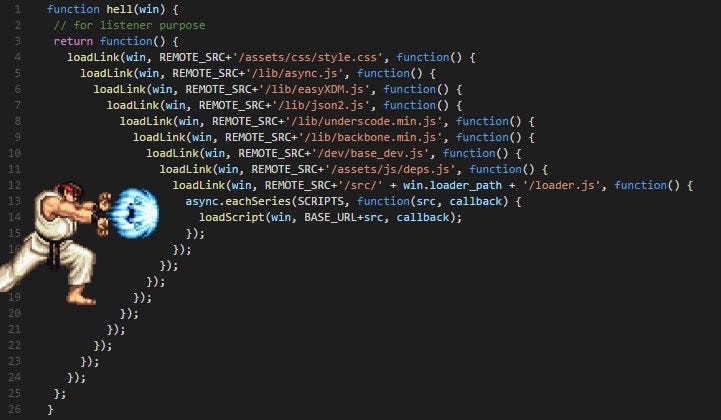
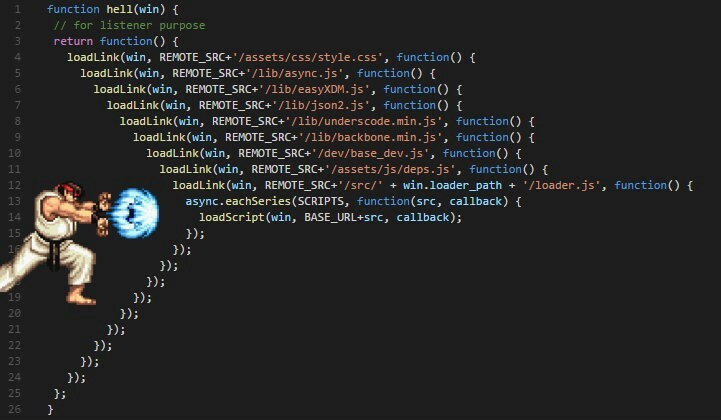
For years, developers relied on callbacks, which often led to the infamous “callback hell,” making code difficult to read and maintain. The introduction of Promises in ES6 (ECMAScript 2015) provided a cleaner abstraction, but it wasn’t until the arrival of Async/Await in ES2017 that writing asynchronous code became truly intuitive. Today, understanding these concepts is a cornerstone of Modern JavaScript development.
This comprehensive guide will take you from JavaScript Basics to JavaScript Advanced concepts regarding asynchronous operations. We will explore how to write cleaner code, handle errors effectively, and optimize performance using the latest JavaScript ES2024 standards. Whether you are building a Full Stack JavaScript application using the MERN Stack or optimizing a frontend with a React Tutorial approach, mastering Async/Await is non-negotiable.
The Evolution of Asynchronous JavaScript
From Callbacks to Promises
To appreciate the elegance of Async/Await, one must understand the problem it solves. In early JavaScript Tutorial resources, you would often see nested functions passed as arguments to handle operations that take time to complete. This nesting created a pyramid structure that was hard to debug. Promises JavaScript solved this by providing an object representing the eventual completion (or failure) of an asynchronous operation and its resulting value.
A Promise exists in one of three states: pending, fulfilled, or rejected. While Promises allowed for “chaining” using .then() and .catch() methods, complex logic could still result in verbose code blocks. This paved the way for Async/Await, which is essentially “syntactic sugar” built on top of Promises. It allows developers to write asynchronous code that looks and behaves like synchronous code, significantly improving readability and maintainability—a key tenet of Clean Code JavaScript.
Understanding the Event Loop
At the heart of JavaScript Async behavior is the Event Loop. When you execute a standard function, it runs on the call stack. Asynchronous operations, however, are offloaded (for example, to the Web API in browsers or C++ APIs in Node.js JavaScript environments). When these operations complete, their callbacks are pushed to a task queue. The Event Loop constantly checks if the call stack is empty; if it is, it pushes tasks from the queue to the stack.
Async/Await pauses the execution of the async function in a non-blocking way, waiting for the Promise to resolve before moving to the next line. This makes logic flow vertically, which is how human brains naturally parse instructions.
Core Syntax Comparison
Let’s look at a practical comparison. Imagine we need to simulate a data fetch operation. Here is how it looks using standard Promises versus the modern Async/Await approach.
// The "Old" Way: Using Promise Chains
function fetchUserDataPromise() {
    console.log("Fetching data...");

    return new Promise((resolve, reject) => {
        setTimeout(() => {
            resolve({ id: 1, username: "DevMaster", role: "Admin" });
        }, 1000);
    })
    .then(user => {
        console.log("User found:", user);
        return user;
    })
    .catch(error => {
        console.error("Error fetching data:", error);
    });
}

// The "Modern" Way: Async/Await
async function fetchUserDataAsync() {
    console.log("Fetching data...");

    try {
        // The 'await' keyword pauses execution here until the Promise resolves
        const user = await new Promise((resolve, reject) => {
            setTimeout(() => {
                resolve({ id: 1, username: "DevMaster", role: "Admin" });
            }, 1000);
        });

        console.log("User found:", user);
        return user;
    } catch (error) {
        console.error("Error fetching data:", error);
    }
}

fetchUserDataAsync();
Implementation Details and Error Handling
The Power of Try/Catch
One of the most significant advantages of Async/Await is the ability to use standard synchronous error handling mechanisms. In a Promise chain, you must rely on .catch() methods. With Async/Await, you can wrap your asynchronous calls in a standard try...catch block. This unifies error handling for both synchronous and asynchronous errors, a practice highly recommended in JavaScript Best Practices.
When working with JavaScript Fetch to consume a REST API JavaScript, robust error handling is vital. Network requests can fail for various reasons: DNS issues, server timeouts, or 404/500 HTTP status codes. Note that the fetch() API only rejects a promise on network failure; it does not reject on HTTP error status codes (like 404). Therefore, manual checks are often required.
Real-World Example: Fetching Data from an API
Let’s implement a robust function that fetches data, handles HTTP errors, and processes the JSON response. This pattern is fundamental whether you are working with React Tutorial projects, Vue.js Tutorial components, or vanilla JavaScript DOM manipulation.
/**
 * Fetches data from a given URL with error handling and timeout support.
 *
 * @param {string} url - The API endpoint
 * @returns {Promise<any>} - The parsed JSON data
 */
async function fetchDataSafe(url) {
    // Create a controller to allow aborting the request (timeout)
    const controller = new AbortController();
    const timeoutId = setTimeout(() => controller.abort(), 5000); // 5 second timeout

    try {
        const response = await fetch(url, { signal: controller.signal });

        // Clear timeout if response is received
        clearTimeout(timeoutId);

        // Check if the response status is OK (200-299)
        if (!response.ok) {
            throw new Error(`HTTP Error! Status: ${response.status}`);
        }

        // Await the parsing of the JSON body
        const data = await response.json();
        return data;

    } catch (error) {
        if (error.name === 'AbortError') {
            console.error("Request timed out.");
        } else {
            console.error("Fetch failed:", error.message);
        }
        // Re-throw or return null based on application needs
        return null;
    }
}

// Usage Example
(async () => {
    const postData = await fetchDataSafe('https://jsonplaceholder.typicode.com/posts/1');
    if (postData) {
        console.log("Post Title:", postData.title);
    }
})();
Integration with Frameworks
In modern JavaScript Frameworks like React, Angular, or Svelte, Async/Await is used extensively. For instance, in a React Tutorial, you cannot make the callback of a useEffect hook async directly because useEffect expects a cleanup function or nothing to be returned, whereas an async function returns a Promise. Instead, you define an async function inside the effect and call it immediately.
Advanced Techniques and Patterns
Parallel vs. Sequential Execution
A common performance pitfall in JavaScript Optimization is awaiting promises sequentially when they don’t depend on each other. If you need to fetch a user’s profile and their posts, and the posts endpoint doesn’t require the profile data first, you should fetch them in parallel. Doing so sequentially creates a “waterfall” effect, doubling the wait time.
To handle parallel execution, we use Promise.all() or the newer Promise.allSettled() (part of JavaScript ES2024 and earlier modern standards). This is crucial for Web Performance.
async function loadDashboardData(userId) {
    const profileUrl = `/api/users/${userId}`;
    const postsUrl = `/api/users/${userId}/posts`;
    const settingsUrl = `/api/users/${userId}/settings`;

    console.time("Sequential Fetch");
    // BAD: Sequential execution (Waterfall)
    // const profile = await fetchDataSafe(profileUrl);
    // const posts = await fetchDataSafe(postsUrl);
    // const settings = await fetchDataSafe(settingsUrl);
    console.timeEnd("Sequential Fetch");

    console.time("Parallel Fetch");
    // GOOD: Parallel execution
    try {
        // Start all requests simultaneously
        const [profile, posts, settings] = await Promise.all([
            fetchDataSafe(profileUrl),
            fetchDataSafe(postsUrl),
            fetchDataSafe(settingsUrl)
        ]);

        return { profile, posts, settings };
    } catch (error) {
        console.error("One of the requests failed, aborting all:", error);
        return null;
    } finally {
        console.timeEnd("Parallel Fetch");
    }
}
Async Iteration: Loops and Await
Handling JavaScript Loops with Async/Await is tricky. Using Array.prototype.forEach with an async callback will not wait for the promises to resolve. The loop will finish instantly, and the promises will resolve later, potentially causing chaos in your application state.
Instead, use the for...of loop, which is aware of await, or map the array to promises and use Promise.all. This distinction is vital when processing JavaScript Arrays of data, such as uploading multiple files or processing a batch of database records in a Node.js JavaScript backend.
TypeScript Integration
For those moving towards JavaScript TypeScript development, typing async functions is straightforward. An async function always returns a Promise. Therefore, the return type is Promise<T>.
interface User {
    id: number;
    name: string;
    email: string;
}

// TypeScript explicitly defines the return type as a Promise containing a User
async function getUser(id: number): Promise<User> {
    const response = await fetch(`/api/users/${id}`);
    if (!response.ok) {
        throw new Error("User not found");
    }
    const data: User = await response.json();
    return data;
}
Best Practices and Optimization
Avoiding “Async/Await Hell”
While Async/Await cleans up code, it can lead to lazy programming where developers wrap everything in await unnecessarily. If a value is not immediately needed for the next line of code, do not await it yet. Initialize the promise, do other work, and then await the result. This is a subtle but powerful JavaScript Trick for optimization.
Top-Level Await
With the advent of ES Modules, modern environments (like the latest Node.js versions and browsers supporting JavaScript ES2024) support “Top-Level Await.” This means you can use the await keyword outside of an async function at the top level of a module. This is particularly useful for initializing database connections or importing dynamic modules in JavaScript Build tools like Vite or Webpack.
Security Considerations
When dealing with AJAX JavaScript and fetching data, always be mindful of JavaScript Security. Never trust data returned from an API blindly. If you are rendering fetched data into the DOM, ensure you are not introducing Cross-Site Scripting (XSS) vulnerabilities. When using innerHTML, sanitize the data first. Frameworks like React handle this automatically, but vanilla JS requires caution.
Debugging Async Code
Debugging asynchronous code can be challenging. However, modern JavaScript Tools and browser DevTools have improved significantly. Async stack traces allow you to see the sequence of calls that led to an error, even if those calls happened across different ticks of the event loop. Utilizing console.log effectively, or better yet, breakpoints in your IDE (VS Code is standard for Full Stack JavaScript), will save hours of frustration.
Conclusion
Async/Await has revolutionized the way we write JavaScript. It bridges the gap between the asynchronous nature of the web and the synchronous way developers think about logic. By mastering these concepts—from basic syntax to advanced parallel execution patterns—you are well on your way to writing professional, production-grade code.
As you continue your journey, whether you are diving into a TypeScript Tutorial, building Progressive Web Apps (PWA) with Service Workers, or architecting a complex JavaScript Backend with Express.js, the principles of asynchronous programming will remain constant. Remember to prioritize readability, handle errors gracefully using try/catch, and optimize for performance by avoiding unnecessary blocking.
The transition from callbacks to Promises, and finally to Async/Await, represents the maturity of the JavaScript ecosystem. Start refactoring your old Promise chains today, and experience the clarity and power of modern asynchronous JavaScript.



