Fortifying the Supply Chain: Advanced NPM Security and Dependency Management in Modern JavaScript
The landscape of Modern JavaScript development has evolved dramatically over the last decade. At the heart of this evolution lies the Node Package Manager (NPM), the world’s largest software registry. For developers building everything from a MERN Stack application to complex JavaScript Backend systems, NPM is the indispensable engine that powers dependency management. However, the convenience of installing libraries with a single command comes with significant risks. Recent trends in cybersecurity have highlighted the fragility of the open-source supply chain, where malicious actors increasingly target widely used packages to inject malware, steal credentials, and compromise build pipelines.
Understanding NPM goes beyond simply running npm install. To be a proficient engineer in Full Stack JavaScript, one must understand the intricacies of dependency trees, lifecycle scripts, and the security implications of third-party code. Whether you are writing a React Tutorial or architecting enterprise-grade Node.js JavaScript services, the security of your supply chain is paramount. This article delves deep into the mechanics of NPM, the anatomy of supply chain attacks, and the architectural patterns required to secure your JavaScript Build process against sophisticated threats.
The Anatomy of NPM and the Supply Chain Threat
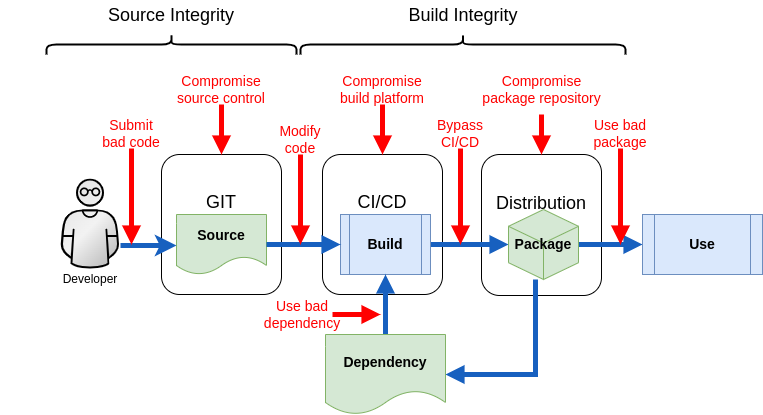
NPM, along with alternatives like Yarn and pnpm, revolutionized how we share code. It allowed the rapid proliferation of JavaScript Frameworks and utilities. However, this ecosystem relies heavily on trust. When you install a package, you are trusting the author, their security practices, and the integrity of their publishing credentials. A compromised package does not just affect the immediate functionality; it can execute code on your machine or CI/CD server.
Lifecycle Scripts: The Hidden Attack Vector
One of the most powerful, yet dangerous, features of NPM is lifecycle scripts. Scripts such as preinstall, install, and postinstall execute automatically when a package is downloaded. While these are intended for compiling binary bindings or setting up environments, they are frequently exploited to run malicious code before the developer even has a chance to inspect the package.
In a typical attack scenario, a malicious actor might publish a useful-looking package or hijack an abandoned one. They inject a script that runs immediately upon installation. This script can scan the environment for AWS/GCP/Azure creds, GitHub Actions secrets, or SSH keys. Using standard JavaScript API calls like JavaScript Fetch or AJAX JavaScript techniques, the malware exfiltrates this sensitive data to a remote server. More aggressive variants might attempt to wipe files or inject themselves into other local packages to spread further.
Here is a conceptual example of how a malicious package might structure its package.json to trigger an attack silently. This highlights why understanding JavaScript JSON configuration is critical for security auditing.
{
  "name": "useful-utility-helper",
  "version": "1.0.0",
  "description": "A helper for JavaScript Async operations",
  "scripts": {
    "preinstall": "node ./scripts/setup-env.js"
  },
  "dependencies": {
    "axios": "^1.6.0"
  }
}
In the background, the setup-env.js file could contain obfuscated code using JavaScript ES2024 features to hide its intent. It might look harmless, perhaps claiming to check for JavaScript TypeScript compatibility, but in reality, it is harvesting environment variables.
Implementation: Securing the Dependency Graph
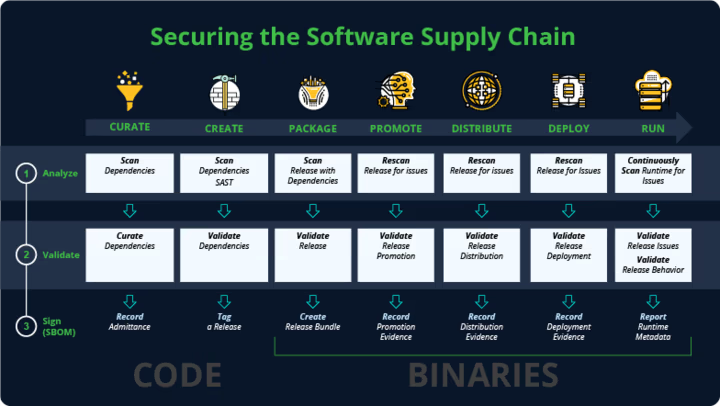
Securing a project involves more than just vigilance; it requires enforcing strict technical controls. Whether you are working on a Vue.js Tutorial project or a high-performance Angular Tutorial codebase, the principles remain the same: lock down versions, sanitize inputs, and restrict execution.
Lockfiles and Strict Versioning
The package-lock.json (or yarn.lock / pnpm-lock.yaml) is your first line of defense. It ensures that every install results in the exact same directory structure. However, developers often ignore lockfile conflicts or delete them to resolve errors. This is a bad practice. A lockfile ensures that a “patch” update in a dependency doesn’t sneak in a compromised version.
Furthermore, you should configure your NPM environment to prevent the execution of arbitrary scripts during installation. This can be done globally or at the project level using an .npmrc file. This effectively neutralizes the preinstall attack vector, though it may require manual steps for packages that genuinely need compilation (like those using Three.js or WebGL bindings).
# .npmrc configuration for enhanced security

# Prevent scripts from running automatically during install
ignore-scripts=true

# Ensure the lockfile is respected strictly (CI mode usually does this)
save-exact=true

# Audit settings
audit-level=high
Auditing and Overrides
NPM includes a built-in audit tool: npm audit. This command checks your dependency tree against a database of known vulnerabilities. In JavaScript Best Practices, running an audit should be a mandatory step in your CI pipeline. If a vulnerability is found in a nested dependency (a dependency of a dependency), you can use the overrides feature (available in NPM 8+) to force a specific version resolution without waiting for the parent package to update.
Below is an example of how to implement an override in package.json to fix a vulnerability in a hypothetical logging library used by a React Tutorial boilerplate.
{
  "name": "secure-app",
  "version": "1.0.0",
  "overrides": {
    "vulnerable-lib": {
      "nested-dependency": "2.1.5"
    }
  },
  "scripts": {
    "audit:ci": "npm audit --audit-level=high --production"
  }
}
Advanced Techniques: Isolation and Containment
For enterprise applications handling sensitive data or JavaScript Payment processing, relying on NPM configuration is not enough. You must assume that a compromise might happen and focus on containment. This is where containerization and strict environment isolation come into play.
Docker and DevContainers
Running npm install directly on your host machine gives scripts access to your personal file system, SSH keys, and global configuration. By moving development into Docker containers or DevContainers, you limit the blast radius of a supply chain attack. If a malicious script runs inside a container, it can only see the container’s file system, protecting your host OS.
When building Docker images for Node.js JavaScript applications, use multi-stage builds. This ensures that development dependencies (which are often the vector for attacks) are not included in the final production image. This also aids in JavaScript Performance and optimization by keeping the image size small.
# syntax=docker/dockerfile:1

# Stage 1: Builder
FROM node:20-alpine AS builder
WORKDIR /app

# Copy config files first to leverage caching
COPY package*.json ./
COPY .npmrc ./

# Install dependencies with strict flags
# --ignore-scripts prevents preinstall malware execution
RUN npm ci --ignore-scripts

COPY . .
# Build the application (e.g., TypeScript to JS, or Webpack bundle)
RUN npm run build

# Stage 2: Runner
FROM node:20-alpine AS runner
WORKDIR /app

ENV NODE_ENV=production

# Create a non-root user for security
RUN addgroup -S appgroup && adduser -S appuser -G appgroup

# Copy only necessary files from builder
COPY --from=builder /app/dist ./dist
COPY --from=builder /app/package*.json ./

# Install ONLY production dependencies
RUN npm ci --omit=dev --ignore-scripts

USER appuser

EXPOSE 3000
CMD ["node", "dist/index.js"]
Runtime Integrity and Secret Scanning
Advanced security strategies also involve scanning your codebase for secrets that might have been accidentally committed. Tools like TruffleHog or Gitleaks should be integrated into your pre-commit hooks. Furthermore, protecting your runtime involves understanding JavaScript Modules (ES Modules). Modern ES Modules provide a more static structure compared to CommonJS, making it slightly harder for attackers to monkey-patch core modules dynamically, although it is not a silver bullet.
When writing JavaScript Functions that handle data, ensure you are validating inputs to prevent XSS (Cross-Site Scripting). XSS Prevention is critical because if a supply chain attack injects malicious JavaScript into your frontend bundle, it can hijack user sessions. Using Clean Code JavaScript principles and Content Security Policies (CSP) helps mitigate the damage if malicious code makes it into the browser.
Best Practices and Ecosystem Optimization
To maintain a healthy JavaScript Ecosystem, developers must adopt a proactive mindset. Security is not a one-time setup but a continuous process. Here are key best practices to integrate into your workflow.
Tooling and Bundlers
Modern bundlers like Vite and Webpack offer plugins to analyze bundle content. Use these to visualize your dependency graph. If you see a package you don’t recognize taking up significant space or requiring unusual permissions, investigate it. JavaScript Bundlers are the final gatekeeper before code reaches the user.
Additionally, consider the impact of dependencies on Web Performance. A compromised package often adds bloat. By regularly pruning unused dependencies and using tools like Depcheck, you reduce the surface area for attacks. Whether you are building Progressive Web Apps or simple Svelte Tutorial projects, fewer dependencies mean fewer potential vulnerabilities.
Automated Verification Script
You can write custom scripts to verify the integrity of your node_modules. The following Node.js JavaScript script uses the fs module (using Promises JavaScript and Async Await) to scan for suspicious files that shouldn’t be in a production build, such as unexpected executables or shell scripts deep in the dependency tree.
const fs = require('fs/promises');
const path = require('path');

async function scanNodeModules(dir) {
    const entries = await fs.readdir(dir, { withFileTypes: true });

    for (const entry of entries) {
        const fullPath = path.join(dir, entry.name);

        if (entry.isDirectory()) {
            await scanNodeModules(fullPath);
        } else {
            // Check for suspicious extensions in deeply nested paths
            if (['.sh', '.exe', '.bat'].includes(path.extname(entry.name))) {
                console.warn(`[WARNING] Suspicious executable found: ${fullPath}`);
            }

            // Check for large files which might indicate hidden payloads
            const stats = await fs.stat(fullPath);
            if (stats.size > 5 * 1024 * 1024) { // 5MB limit
                console.warn(`[WARNING] Unusually large file found: ${fullPath}`);
            }
        }
    }
}

console.log("Starting security scan of node_modules...");
scanNodeModules('./node_modules')
    .then(() => console.log("Scan complete."))
    .catch(err => console.error("Scan failed:", err));
Conclusion
The NPM ecosystem is a powerful enabler of Modern JavaScript development, allowing for the rapid construction of complex applications ranging from JavaScript Animation libraries using Canvas JavaScript to robust Rest API JavaScript backends. However, the open nature of this ecosystem requires developers to be vigilant guardians of their supply chains.
By understanding the risks associated with lifecycle scripts, enforcing strict lockfile policies, utilizing containerization like Docker, and regularly auditing dependencies, you can significantly reduce the risk of falling victim to a supply chain attack. Security is not a feature you add at the end; it is a fundamental aspect of the development process. As you continue to explore JavaScript Tips and JavaScript Design Patterns, make security a core component of your learning path. The safety of your application, your credentials, and your users depends on the integrity of the code you import.