

Mastering JavaScript Objects: A Comprehensive Guide for Modern Developers
In the vast universe of JavaScript, one concept stands as the central sun around which everything else orbits: the Object. From simple data structures to complex browser APIs, objects are the fundamental building blocks of the language. Whether you’re manipulating the DOM, fetching data from an API, or building a complex application with frameworks like React or Node.js, a deep understanding of objects is non-negotiable. They are not just data containers; they are dynamic, versatile entities that empower developers to write organized, efficient, and powerful code.
This comprehensive guide will take you on a journey through the world of JavaScript Objects. We’ll start with the core fundamentals, move on to practical, real-world implementations involving functions and asynchronous operations, explore advanced techniques introduced in modern JavaScript (ES6 and beyond), and conclude with best practices for writing clean, performant code. By the end, you’ll have the knowledge and confidence to leverage the full potential of objects in your web development projects.
The Core Concepts: Building with JavaScript Objects
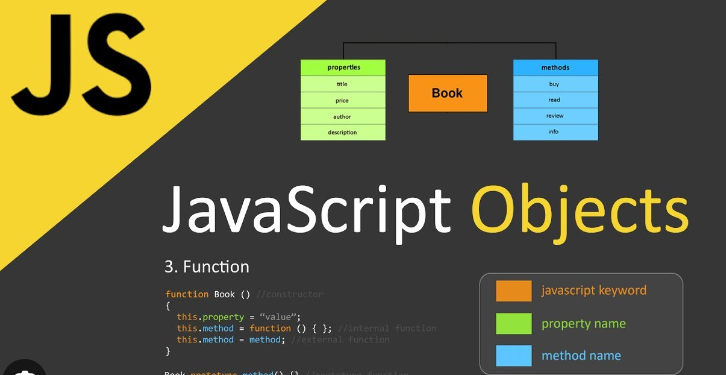
At its heart, a JavaScript object is a collection of key-value pairs. These pairs are called “properties.” The key is a string (or a Symbol), and the value can be anything: a string, a number, a boolean, an array, or even another object or a function. This flexibility is what makes objects so incredibly powerful.
Creating and Manipulating Objects
The most common and straightforward way to create an object is using the object literal syntax, denoted by curly braces {}.
Once an object is created, you can access, add, or modify its properties using two primary methods: dot notation and bracket notation.

- Dot Notation (
object.property): This is the most common syntax. It’s clean and easy to read, but it only works when the property key is a valid JavaScript identifier (no spaces, hyphens, or starting with a number). - Bracket Notation (
object['property']): This syntax is more versatile. It allows you to use strings with special characters as keys and to use variables to dynamically access property names.
When a function is a value of a property, it’s called a method. Methods define the behavior of an object.
// 1. Creating an object using literal syntax
const user = {
  firstName: 'Alex',
  lastName: 'Doe',
  age: 30,
  isDeveloper: true,
  skills: ['JavaScript', 'React', 'Node.js'],

  // A method is a function inside an object
  getFullName: function() {
    // 'this' refers to the 'user' object itself
    return `${this.firstName} ${this.lastName}`;
  }
};

// 2. Accessing properties
console.log('Using Dot Notation:', user.firstName); // Output: Alex
console.log('Using Bracket Notation:', user['skills']); // Output: ['JavaScript', 'React', 'Node.js']

// Using a method
console.log('Full Name:', user.getFullName()); // Output: Alex Doe

// 3. Modifying a property
user.age = 31;
console.log('Updated Age:', user.age); // Output: 31

// 4. Adding a new property
user.country = 'USA';
console.log('Country:', user.country); // Output: USA

// 5. Deleting a property
delete user.isDeveloper;
console.log('User object after deletion:', user);
Objects in Action: Interacting with the Browser
Objects are not just for storing data; they are the primary way we interact with the web page itself. The entire Document Object Model (DOM) is a tree-like structure of objects. Every HTML element on a page is an object with its own properties (like id, className, textContent) and methods (like addEventListener, querySelector).
Manipulating the DOM with Objects
When you use a method like document.getElementById('myButton'), you are retrieving a specific element object. You can then manipulate this object to change its appearance, content, or behavior. A common task is to add an event listener, which attaches a function to be executed when a specific event (like a ‘click’) occurs. This function, often called a callback function, can then interact with other DOM element objects.
Let’s see a practical example. We’ll have a button and a paragraph. When the button is clicked, we’ll update the paragraph’s text content. This entire interaction is managed by manipulating JavaScript objects that represent our HTML elements.
<!-- index.html -->
<h2>DOM Interaction Example</h2>
<p id="status-text">Click the button to update this text.</p>
<button id="update-btn">Update Status</button>

<script src="app.js"></script>
// app.js
// 1. Select DOM elements. These are objects!
const statusText = document.getElementById('status-text');
const updateButton = document.getElementById('update-btn');
// 2. The 'updateButton' object has a method called 'addEventListener'.
// We pass the event type ('click') and a callback function.
updateButton.addEventListener('click', () => {
// 3. Access and modify the 'textContent' property of the 'statusText' object.
statusText.textContent = 'The text has been updated!';
// 4. We can also manipulate other properties, like 'style'.
statusText.style.color = 'green';
statusText.style.fontWeight = 'bold';
// 'this' inside an arrow function refers to the outer scope,
// which is the global window object in this case.
// If we used a regular function, 'this' would refer to 'updateButton'.
console.log(this);
});Advanced Techniques with Modern JavaScript (ES6+)
Modern JavaScript, starting with ES6 (ECMAScript 2015) and continuing through to the latest ES2024 specifications, has introduced powerful syntax and features that make working with objects more elegant and efficient. These features are now standard in all modern browsers and are essential for any JavaScript developer.
Destructuring, Spread, and Asynchronous Operations
- Object Destructuring: A concise syntax to unpack values from objects into distinct variables. It makes code cleaner and easier to read.
- Spread Syntax (
...): Allows an iterable (like an object’s own enumerable properties) to be expanded in places where multiple arguments or elements are expected. It’s incredibly useful for creating shallow copies or merging objects. - Async/Await with Fetch API: Objects are central to modern asynchronous operations. When you fetch data from a REST API using the
fetchfunction, the response is processed into a JavaScript object. Theasync/awaitsyntax provides a clean way to handle these asynchronous, promise-based operations.
In the following example, we’ll fetch user data from a public API, use destructuring to extract specific information, and then use that data to update the DOM. This single example combines JavaScript Async, Promises, the Fetch API, and modern object manipulation techniques.
// HTML needed for this script
// <div id="user-profile">Loading...</div>

const userProfileDiv = document.getElementById('user-profile');

// An async function to fetch and display user data
const fetchUserData = async () => {
  try {
    // Use the Fetch API, which returns a Promise
    const response = await fetch('https://jsonplaceholder.typicode.com/users/1');

    // Check if the request was successful
    if (!response.ok) {
      throw new Error(`HTTP error! Status: ${response.status}`);
    }

    // The .json() method also returns a Promise that resolves with the parsed JSON data as a JavaScript object
    const userData = await response.json();

    // 1. Using Object Destructuring to extract properties
    const { name, email, company } = userData;
    const { name: companyName } = company; // Nested destructuring

    // 2. Using Spread Syntax to create a new, simplified object for logging
    const basicInfo = { name, email };
    const extendedInfo = {
      ...basicInfo,
      company: companyName,
      fetchedAt: new Date().toLocaleTimeString()
    };
    console.log('Extended User Info:', extendedInfo);

    // 3. Update the DOM with the fetched object data
    userProfileDiv.innerHTML = `
      <h3>${name}</h3>
      <p>Email: ${email}</p>
      <p>Company: ${companyName}</p>
    `;

  } catch (error) {
    console.error('Failed to fetch user data:', error);
    userProfileDiv.textContent = 'Could not load user profile.';
    userProfileDiv.style.color = 'red';
  }
};

// Call the async function
fetchUserData();
Best Practices and Performance Optimization
Writing functional code is just the first step. Writing clean, maintainable, and performant code is what separates professional developers. When working with objects, adhering to certain best practices can significantly improve your application’s quality.
Immutability and Data Structures

A core principle in modern JavaScript, especially in libraries like React, is immutability. Instead of modifying (mutating) an object directly, you create a new object with the updated properties. This practice prevents unintended side effects and makes state management more predictable. The spread syntax (...) is a perfect tool for this.
const settings = {
  theme: 'dark',
  notifications: true
};

// Instead of mutating: settings.theme = 'light'; (BAD)

// Create a new object with the updated value (GOOD)
const updatedSettings = {
  ...settings,
  theme: 'light'
};

console.log(settings); // Original object is unchanged: { theme: 'dark', notifications: true }
console.log(updatedSettings); // New object: { theme: 'light', notifications: true }
Common Pitfalls and Considerations
- Shallow vs. Deep Copy: The spread syntax and
Object.assign()perform a shallow copy. If an object contains other nested objects, only the references to those nested objects are copied, not the objects themselves. Modifying a nested object in the copy will also affect the original. For deep copies, you may need a utility function or libraries like Lodash. - `this` Keyword Context: The value of
thiscan be confusing. In regular functions, it’s determined by how the function is called. In arrow functions, it’s lexically bound (it inheritsthisfrom the parent scope). Be mindful of this difference, especially in event handlers or methods. - Object vs. Map: For simple key-value stores with string keys, objects are fine. However, if you need keys of any type (e.g., an object as a key), require better performance for frequent additions/deletions, or need to easily get the size, the
Mapobject introduced in ES6 is often a better choice.
Conclusion: The Versatility of JavaScript Objects
We’ve journeyed from the fundamental definition of a JavaScript object to its advanced applications in modern web development. We’ve seen how objects are not just simple data containers but are the very fabric of browser interaction through the DOM, the primary format for data exchange with APIs, and the beneficiary of powerful modern syntax like destructuring and spread. Understanding objects is synonymous with understanding JavaScript itself.
As you continue your journey, challenge yourself to see objects everywhere. Analyze the structure of data from a REST API, inspect DOM elements in your browser’s developer tools, and observe how frameworks like React, Vue.js, or Svelte use objects for state and props. By mastering objects, you are building a solid foundation that will support you throughout your entire career as a Full Stack JavaScript developer, from front-end animations to backend logic with Node.js and Express.js.


