

Mastering Modern JavaScript Tools: Optimizing Performance and Main Thread Control
The landscape of web development has evolved dramatically over the last decade. What began as a language for simple form validation has transformed into the backbone of the modern web. Today, Modern JavaScript powers everything from complex frontend interfaces to robust backend architectures. As the complexity of applications grows, so does the need for sophisticated JavaScript Tools. Developers are no longer just writing scripts; they are architecting ecosystems using JavaScript ES2024 standards, managing state across asynchronous boundaries, and fighting for every millisecond of performance on the browser’s main thread.
Recent advancements in the ecosystem, particularly within the React Tutorial space and JavaScript Frameworks, have highlighted a critical shift: the move towards granular control over resource allocation. New capabilities in libraries are emerging to help developers preserve UI state while drastically reducing the load on the main thread. This evolution is crucial for improving metrics like Interaction to Next Paint (INP). In this comprehensive guide, we will explore the essential tools and techniques defining the current era of development, from JavaScript Build processes to advanced JavaScript Performance optimization.
Section 1: The Foundation – Bundlers, Transpilers, and Modern Build Chains
Before diving into UI libraries, one must understand the engine room of Full Stack JavaScript development: the build toolchain. In the past, developers might have manually linked script tags. Today, tools like Webpack, Vite, and JavaScript Bundlers are indispensable. They serve multiple purposes: bundling ES Modules into a single file to reduce HTTP requests, transpiling JavaScript TypeScript into browser-compatible code, and optimizing assets.
The Rise of Vite and Next-Gen Bundling
While Webpack established the standard, tools like Vite have revolutionized the developer experience by leveraging native ES Modules in the browser during development. This eliminates the “bundling” wait time before the server starts. However, the production build still relies on bundling to ensure JavaScript Optimization. These tools also handle JavaScript Polyfills, ensuring that modern Arrow Functions and Async Await syntax work on older devices.
Furthermore, package managers like NPM, Yarn, and pnpm are the gatekeepers to the vast ecosystem of libraries. Understanding how to manage dependencies efficiently is a core skill in JavaScript Best Practices. A bloated `node_modules` folder can lead to slower install times and CI/CD bottlenecks.
Let’s look at a practical example of a modern module setup using JavaScript Classes and ES Modules, which a tool like Vite would handle seamlessly.
// dataService.js
// A service class using ES Modules and Private Fields (ES2022+)

export class DataService {
    #baseUrl;

    constructor(baseUrl) {
        this.#baseUrl = baseUrl;
    }

    /**
     * Fetches data asynchronously
     * @param {string} endpoint
     * @returns {Promise<any>}
     */
    async fetchData(endpoint) {
        try {
            const response = await fetch(`${this.#baseUrl}/${endpoint}`);

            if (!response.ok) {
                throw new Error(`HTTP error! status: ${response.status}`);
            }

            // Parsing JSON is a blocking operation, usually fast,
            // but heavy JSON can impact the main thread.
            const data = await response.json();
            return data;
        } catch (error) {
            console.error("API Error:", error);
            throw error;
        }
    }
}

// main.js
import { DataService } from './dataService.js';

const api = new DataService('https://api.example.com/v1');

// Using Top-level await (supported in modern bundlers)
try {
    const users = await api.fetchData('users');
    console.log('Users loaded:', users);
} catch (e) {
    // Error handling logic
}
Section 2: Framework Evolution and State Management
The battleground for JavaScript Frameworks—whether it is a React Tutorial, Vue.js Tutorial, Angular Tutorial, or Svelte Tutorial—has shifted from simple data binding to complex concurrency. The goal is to keep the application responsive even when heavy computations or network requests are occurring. This is where the concept of “controlling the main thread” becomes paramount.

Concurrency and the Main Thread
In the context of React JS and similar libraries, new patterns are emerging to handle “Activity” states. The idea is to allow the browser to prioritize high-priority updates (like typing in an input) while deferring lower-priority updates (like rendering a list of results). This prevents the UI from freezing, a common issue in JavaScript DOM manipulation known as “jank.”
Modern tools leverage the JavaScript API for scheduling to achieve this. By effectively managing the JavaScript Event Loop, frameworks can pause rendering work to let the browser paint a frame, then resume work. This is vital for Web Performance.
Here is an example demonstrating how one might implement a debounce mechanism manually to optimize main thread usage during a search event, mimicking how frameworks optimize JavaScript Events internally.
// optimizationUtils.js

/**
 * A debounce function to limit the rate at which a function can fire.
 * Crucial for scroll events, resizing, or keypresses to prevent
 * main thread blocking.
 */
export function debounce(func, wait) {
    let timeout;

    return function executedFunction(...args) {
        const later = () => {
            clearTimeout(timeout);
            func(...args);
        };

        clearTimeout(timeout);
        timeout = setTimeout(later, wait);
    };
}

// implementation.js
import { debounce } from './optimizationUtils.js';

const searchInput = document.getElementById('search-input');
const resultsContainer = document.getElementById('results');

// Simulating a heavy DOM update
const updateUI = (query) => {
    console.log(`Updating UI for query: ${query}`);
    // Imagine heavy DOM manipulation here
    resultsContainer.innerHTML = `<p>Results for ${query}...</p>`;
};

// Without debounce, this fires on every keystroke, potentially freezing the UI
const handleInput = (e) => {
    updateUI(e.target.value);
};

// With debounce, we wait 300ms after the user stops typing
const optimizedHandleInput = debounce((e) => {
    updateUI(e.target.value);
}, 300);

searchInput.addEventListener('input', optimizedHandleInput);
Section 3: Advanced Performance Tuning and Off-Main-Thread Architecture
To truly master JavaScript Advanced concepts, one must look beyond the main thread. The browser’s main thread is responsible for JavaScript execution, style calculation, layout, and painting. If your JavaScript Loops or data processing takes too long, the page becomes unresponsive. This is where Web Workers and Service Workers come into play.
Offloading with Web Workers
Web Workers allow you to run scripts in background threads. This is essential for JavaScript PWA (Progressive Web Apps) and complex applications dealing with image processing, large JavaScript Arrays sorting, or encryption. By moving these tasks off the main thread, the UI remains buttery smooth (60fps), regardless of the heavy lifting happening in the background.
Measuring Performance
You cannot optimize what you cannot measure. Modern DevTools provide “Performance Tracks” that visualize exactly what the CPU is doing. Programmatically, the Performance API allows developers to track “Long Tasks” (tasks taking >50ms) which are the primary culprits of poor responsiveness.
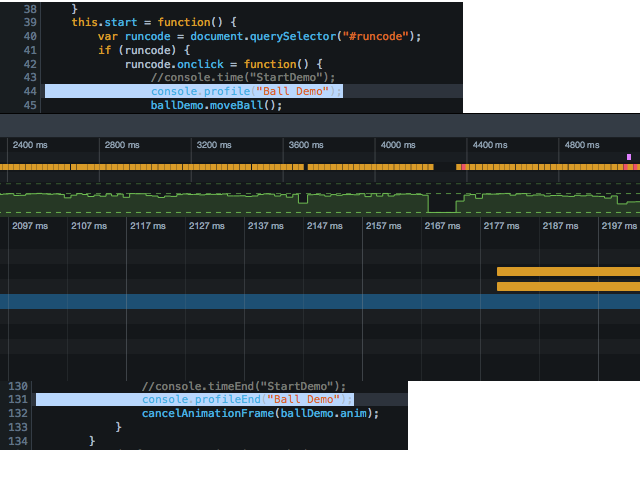
Below is an example of using a Web Worker to handle a heavy calculation, ensuring the main thread stays free for user interaction.
// worker.js
// This code runs in a separate thread
self.onmessage = function(e) {
    console.log('Worker: Message received from main script');
    const { data } = e;

    // Simulate a heavy computation (e.g., processing large JSON or image data)
    const start = performance.now();
    let result = 0;
    // A loop that would normally freeze the browser
    for (let i = 0; i < data.iterations; i++) {
        result += Math.sqrt(i) * Math.random();
    }
    const end = performance.now();

    console.log('Worker: Posting message back to main script');
    self.postMessage({
        result: result,
        timeTaken: (end - start).toFixed(2) + 'ms'
    });
}

// main.js
const worker = new Worker('worker.js');

const runHeavyTask = () => {
    const statusDiv = document.getElementById('status');
    statusDiv.textContent = "Processing...";

    // Send data to the worker
    worker.postMessage({ iterations: 100000000 });
};

worker.onmessage = function(e) {
    const { result, timeTaken } = e.data;
    document.getElementById('status').textContent =
        `Calculation complete in ${timeTaken}. Result: ${result.toFixed(2)}`;
    console.log('Main: Message received from worker');
};

// Even while the worker computes, this button remains clickable!
document.getElementById('alert-btn').addEventListener('click', () => {
    alert('UI is still responsive!');
});
Section 4: Backend Integration, Testing, and Best Practices
A comprehensive view of JavaScript Tools includes the server side. Node.js JavaScript and frameworks like Express.js allow for a unified language across the stack (MERN Stack). However, moving to the backend introduces new challenges regarding JavaScript Security (like XSS Prevention) and data validation.
Testing: The Safety Net
Reliable software requires testing. JavaScript Testing frameworks like Jest Testing or Vitest are critical. They allow you to write unit tests for your logic and integration tests for your API endpoints. Writing Clean Code JavaScript means writing code that is testable. If a function relies heavily on global state or DOM side effects, it is difficult to test. Dependency injection and pure functions are JavaScript Design Patterns that aid in this.
Here is an example of a backend API endpoint using Express, coupled with a theoretical test case demonstrating how to verify asynchronous logic.
// server.js (Node.js / Express)
import express from 'express';
const app = express();

// Middleware for parsing JSON
app.use(express.json());

// Mock Database
const users = [{ id: 1, name: 'Alice' }];

// Async route handler
app.get('/api/users/:id', async (req, res) => {
    try {
        const userId = parseInt(req.params.id);

        // Simulate async DB call
        const user = await new Promise(resolve =>
            setTimeout(() => resolve(users.find(u => u.id === userId)), 50)
        );

        if (!user) {
            return res.status(404).json({ error: 'User not found' });
        }

        res.json(user);
    } catch (error) {
        res.status(500).json({ error: 'Internal Server Error' });
    }
});

// ---------------------------------------------------------
// user.test.js (Jest / Vitest)
// ---------------------------------------------------------
/*
import request from 'supertest';
import app from './server'; // Export app from server.js

describe('GET /api/users/:id', () => {
    it('should return user data for valid ID', async () => {
        const res = await request(app).get('/api/users/1');
        expect(res.statusCode).toEqual(200);
        expect(res.body).toHaveProperty('name', 'Alice');
    });

    it('should return 404 for invalid ID', async () => {
        const res = await request(app).get('/api/users/999');
        expect(res.statusCode).toEqual(404);
    });
});
*/
Security and Optimization Tips
When building full-stack applications, always sanitize inputs to prevent injection attacks. Furthermore, consider using GraphQL JavaScript for more efficient data fetching compared to standard REST API JavaScript, as it allows clients to request exactly what they need, reducing payload size. For offline capabilities, implementing Service Workers transforms a standard site into a JavaScript Offline capable application.
Conclusion: The Future of JavaScript Tooling
As we look toward the future of JavaScript ES6 and beyond, the trend is clear: tools are becoming smarter, faster, and more integrated. From React 19 innovations that give developers granular control over the browser’s main thread to build tools like Vite that make development instantaneous, the ecosystem is thriving. Mastering these tools is no longer optional; it is a requirement for building high-performance, scalable web applications.
To stay ahead, focus on understanding the underlying concepts—how the event loop works, how the DOM renders, and how asynchronous code executes—rather than just memorizing syntax. Experiment with Web Workers, dive into JavaScript Animation with Canvas JavaScript or Three.js, and never neglect the importance of JavaScript Testing. By combining robust architectural patterns with modern tooling, you can deliver user experiences that are not only functional but exceptionally fast and responsive.


