

Deep Dive into JavaScript Loops: From Iteration to the Event Loop
JavaScript is the lifeblood of modern web development, powering everything from interactive user interfaces to robust server-side architectures. Whether you are building a Full Stack JavaScript application using the MERN Stack or optimizing a frontend with a React Tutorial, understanding how JavaScript handles repetition and execution order is fundamental. While most developers are familiar with basic iteration—loops that repeat actions—there is a deeper, more complex mechanism at play: the JavaScript Event Loop.
In this comprehensive guide, we will explore the dual nature of loops in Modern JavaScript. We will start with the syntax used for data iteration, exploring JavaScript ES6 features and JavaScript Arrays. Then, we will transition into the architectural “loop” that drives the language’s non-blocking behavior: the Event Loop. By mastering both, you can write Clean Code JavaScript that is performant, predictable, and scalable. This article covers JavaScript Basics through JavaScript Advanced concepts, ensuring you have the knowledge to handle JavaScript Async operations, REST API JavaScript calls, and complex DOM manipulations effectively.
Section 1: The Foundation – Iteration and Data Loops
Before diving into the asynchronous nature of the runtime, we must master how we iterate over data. JavaScript Loops have evolved significantly. While the traditional for loop is still functional, ES6 (and subsequent updates like JavaScript ES2024) introduced more declarative and readable ways to handle collections.
Modern Iteration: for…of and High-Order Functions
In JavaScript Best Practices, readability is often prioritized alongside performance. The for...of loop is a versatile tool for iterating over iterable objects, including JavaScript Arrays, strings, Maps, and Sets. Unlike the legacy for...in loop (which iterates over enumerable properties and is better suited for JavaScript Objects), for...of accesses values directly.
However, in functional programming paradigms often used in React Tutorial or Vue.js Tutorial contexts, developers prefer array methods like map, filter, and reduce. These methods provide a cleaner syntax for transforming data without managing loop counters.
Let’s look at a practical example comparing a standard loop with a modern functional approach for data transformation.
// Scenario: We have an array of raw user data and need to normalize it.
const rawUsers = [
    { id: 1, name: "Alice", role: "admin", active: true },
    { id: 2, name: "Bob", role: "user", active: false },
    { id: 3, name: "Charlie", role: "user", active: true }
];

// APPROACH 1: Modern for...of Loop
// Good for side effects or when you need to break/continue
const activeUserNames = [];
for (const user of rawUsers) {
    if (user.active) {
        // Template literals are a staple of Modern JavaScript
        activeUserNames.push(`${user.name} (${user.role})`);
    }
}
console.log("For...of Result:", activeUserNames);

// APPROACH 2: Functional Array Methods (Map/Filter)
// Preferred in React/Redux for immutability
const processedUsers = rawUsers
    .filter(user => user.active)
    .map(user => ({
        ...user, // Spread syntax
        displayName: `${user.name.toUpperCase()}`
    }));

console.log("Functional Result:", processedUsers);
Understanding these iteration methods is crucial. However, a common pitfall occurs when developers try to combine these synchronous loops with JavaScript Async operations, such as making JavaScript Fetch requests inside a forEach loop. This leads us to the most critical concept in JavaScript execution.
Section 2: The Heart of the Runtime – The Event Loop
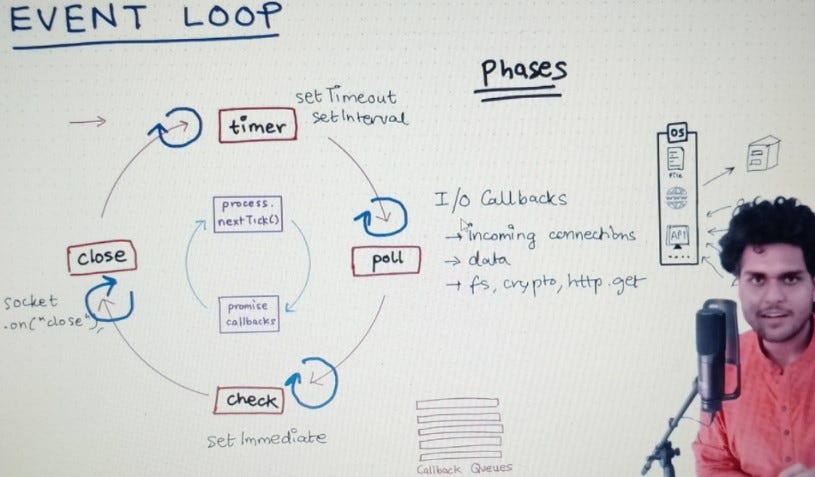
JavaScript is a single-threaded language. This means it has one Call Stack and can do one thing at a time. However, Node.js JavaScript backends and web browsers perform heavy tasks—like network requests, JavaScript Animation, or timer delays—without freezing the interface. This magic is achieved through the Event Loop.
Call Stack, Web APIs, and the Callback Queue
To understand the Event Loop, you must visualize three components:
Apple TV 4K with remote – New Design Amlogic S905Y4 XS97 ULTRA STICK Remote Control Upgrade …
- Call Stack: Where your code is currently executing. LIFO (Last In, First Out).
- Web APIs (or C++ APIs in Node): Where asynchronous tasks (like
setTimeout, DOM events, or AJAX JavaScript requests) are offloaded. - Callback Queue (Task Queue): Where callbacks wait to be executed after the asynchronous task finishes.
The Event Loop has a simple job: it monitors the Call Stack and the Callback Queue. If the Call Stack is empty, it takes the first event from the queue and pushes it onto the stack. This architecture explains why a setTimeout with a delay of 0ms doesn’t execute immediately.
console.log("1. Script Start");

// This is offloaded to Web APIs, then the callback goes to the Queue
setTimeout(() => {
    console.log("2. setTimeout Callback");
}, 0);

// Promise callbacks go to the Microtask Queue (Higher Priority)
Promise.resolve().then(() => {
    console.log("3. Promise Microtask");
});

console.log("4. Script End");

/*
   EXPECTED OUTPUT:
   1. Script Start
   4. Script End
   3. Promise Microtask
   2. setTimeout Callback

   EXPLANATION:
   Synchronous code runs first (1, 4).
   Then the Event Loop checks the Microtask Queue (Promises).
   Finally, it checks the Macrotask Queue (setTimeout).
*/
This distinction between Microtasks (Promises, queueMicrotask) and Macrotasks (setTimeout, setInterval, I/O) is vital for JavaScript Performance. Microtasks are processed immediately after the current script and before rendering, whereas Macrotasks yield to the browser’s rendering cycle.
Section 3: Asynchronous Loops and Control Flow
When building a JavaScript Backend with Express.js or a frontend connecting to a GraphQL JavaScript endpoint, you will inevitably need to perform asynchronous operations inside a loop. This is where Async Await and Promises JavaScript interact with the loop structures we discussed earlier.
The “forEach” Trap
A common mistake among beginners learning JavaScript Basics is assuming Array.prototype.forEach works with await. It does not. forEach expects a synchronous function and will not pause for a Promise to resolve. Instead, it fires off all asynchronous operations almost instantly and moves on.
To handle async operations in a loop sequentially, use for...of. To handle them concurrently (for better performance), use Promise.all. Here is a practical example involving a mock REST API JavaScript call.
// Simulating a network request
const fetchUserData = (id) => {
    return new Promise(resolve => {
        setTimeout(() => {
            console.log(`Finished fetching user ${id}`);
            resolve({ id, data: "Secret Data" });
        }, 1000);
    });
};

const userIds = [101, 102, 103];

// ❌ BAD PRACTICE: Using forEach with async
// This will not wait. The "Done" message prints before data arrives.
/*
userIds.forEach(async (id) => {
    await fetchUserData(id);
});
console.log("Done?");
*/

// ✅ OPTION 1: Sequential Processing (for...of)
// Use this when order matters or requests depend on each other
async function processSequentially() {
    console.time("Sequential");
    for (const id of userIds) {
        // The loop pauses here until the promise resolves
        const data = await fetchUserData(id);
    }
    console.timeEnd("Sequential"); // Takes approx 3000ms
}

// ✅ OPTION 2: Parallel Processing (Promise.all)
// Use this for performance when requests are independent
async function processParallel() {
    console.time("Parallel");

    // Create an array of pending promises
    const promises = userIds.map(id => fetchUserData(id));

    // Wait for all to finish
    const results = await Promise.all(promises);

    console.timeEnd("Parallel"); // Takes approx 1000ms
    return results;
}

// Execute
// processParallel();
Mastering these patterns is essential for JavaScript Optimization. Using sequential loops when parallel execution is possible is a major bottleneck in Web Performance.
Section 4: Advanced Techniques – The Rendering Loop
Beyond data processing, loops are critical for Web Animation and visual updates. In the browser environment, the Event Loop coordinates with the rendering pipeline. If you use a while(true) loop, you will block the call stack, freezing the UI and preventing the browser from repainting.
requestAnimationFrame vs. setInterval
For animations, relying on setInterval or setTimeout is imprecise because they don’t align with the monitor’s refresh rate. Modern JavaScript provides requestAnimationFrame, which hooks directly into the browser’s refresh loop (usually 60fps). This is the foundation for libraries like Three.js and Canvas JavaScript implementations.
Here is how to implement a non-blocking animation loop that is performant and battery-friendly.

Apple TV 4K with remote – Apple TV 4K 1st Gen 32GB (A1842) + Siri Remote – Gadget Geek
// Practical Example: A smooth animation loop
// This mimics how game loops or canvas animations work

const box = document.getElementById('animate-me');
let position = 0;
let isAnimating = false;

function animate() {
    if (!isAnimating) return;

    // Update state
    position += 2;

    // Render state (DOM manipulation)
    // In a real app, this might be WebGL or Canvas drawing
    if (box) {
        box.style.transform = `translateX(${position}px)`;
    }

    // Reset condition
    if (position > 500) position = 0;

    // Recursive call synchronized with the browser paint cycle
    requestAnimationFrame(animate);
}

function startAnimation() {
    if (!isAnimating) {
        isAnimating = true;
        requestAnimationFrame(animate);
    }
}

function stopAnimation() {
    isAnimating = false;
}

// Note: requestAnimationFrame pauses automatically when
// the user switches tabs, saving battery life.
For extremely heavy calculations that would otherwise block the main thread and the Event Loop, developers should utilize Web Workers. This allows you to run a loop in a background thread, keeping the UI responsive—a key strategy in Progressive Web Apps (PWA).
Section 5: Best Practices and Optimization
Writing efficient loops requires more than just syntax knowledge. Whether you are using TypeScript or vanilla JS, adhering to JavaScript Design Patterns ensures maintainability and security.
1. Avoid Blocking the Event Loop
Never run heavy computation (like image processing or large JSON parsing) on the main thread. If a loop takes longer than 50ms to execute, it creates a “Long Task,” resulting in a janky user experience. Offload these to Web Workers or break the task into smaller chunks using setTimeout to yield control back to the browser periodically.
2. Memory Management
Be cautious with closures inside loops. Creating functions inside a loop can lead to high memory usage. Additionally, ensure you clear intervals and event listeners when components unmount, especially in Single Page Applications (SPAs) like those built with React or Angular Tutorial guides, to prevent memory leaks.
3. Security Considerations
Apple TV 4K with remote – Apple TV 4K iPhone X Television, Apple TV transparent background …
When looping through data to render HTML, you are vulnerable to XSS Prevention (Cross-Site Scripting) issues. Never use innerHTML inside a loop with unsanitized user data. Always use textContent or safe DOM creation methods provided by frameworks.
4. Tooling and Bundlers
Modern JavaScript Build tools like Vite, Webpack, and package managers like NPM, Yarn, or pnpm help transpile modern loop syntax (like for...of) into code compatible with older browsers. Ensure your build pipeline is configured correctly to handle polyfills if you need to support legacy environments.
Conclusion
Mastering JavaScript Loops is a journey that extends far beyond writing a simple for statement. It involves understanding the intricate dance of the JavaScript Event Loop, managing the Call Stack, and coordinating Microtasks and Macrotasks. By leveraging modern iteration syntax, handling Async Await correctly, and respecting the browser’s rendering cycle with requestAnimationFrame, you elevate your code from functional to professional.
As you continue your development journey—perhaps exploring TypeScript Tutorial resources or diving into JavaScript Testing with Jest Testing—keep the Event Loop in mind. It is the engine that drives the non-blocking, high-performance nature of the web. Whether you are building JavaScript Offline capabilities with Service Workers or complex JavaScript API integrations, the efficiency of your loops determines the quality of your user experience.


