Inside SvelteKit preload functions and router prefetch latency
Last updated: May 10, 2026
SvelteKit preloading reduces perceived navigation delay by starting route code imports and load work before the click finishes. It does not make rendering free, bypass authorization, or guarantee fresh data. For the query sveltekit preload prefetch latency, the useful answer is this: choose the least eager preload signal that matches real user intent, then measure whether it hides code download, data fetch time, or both.
data-sveltekit-preload-data="hover"can hide route imports andloadfetches before click, but it can also cache stale data.data-sveltekit-preload-data="tap"waits formousedownortouchstart, so it creates fewer false-positive requests than hover.data-sveltekit-preload-codecan preload route modules without running data loads, which is safer for volatile pages.- SvelteKit skips data and code preloading when
navigator.connection.saveDatais enabled, according to the official link-options docs. - Use
false, not old Sapper-eraoffwording, when disabling inherited SvelteKit preload options in current docs.
What SvelteKit preloading actually moves earlier
SvelteKit preloading moves two expensive parts of client-side navigation earlier: JavaScript route module import and route load execution. The final click still matters. The router still needs to confirm the navigation, reuse or invalidate cached data, update state, render the next page, and let the browser paint.
The official SvelteKit link options documentation describes two related attributes: data-sveltekit-preload-data and data-sveltekit-preload-code. The naming is precise. Data preloading runs the machinery needed to obtain page data. Code preloading is narrower: it fetches the route code so the later navigation does not pay the dynamic import cost.
That distinction is the core of SvelteKit preload prefetch latency tuning. A dashboard route with expensive JavaScript but volatile metrics benefits from code preload. A docs route with stable content and a predictable navigation path can benefit from data preload. A destructive admin workflow should usually avoid eager data preload unless the underlying endpoints are read-only, idempotent, and cheap.
Think of a navigation as four blocks:
Intent signal → route code → load data → render commit.
Preload changes where the second and third blocks start. It does not remove the fourth block. If a page is slow because the client renders a huge chart after data arrives, preloading may make the wait feel shorter, but it will not fix the render cost. If a route is slow because the server waits on a database query, data preload can hide part of that wait only when the user gives enough intent before clicking.
SvelteKit also exposes programmatic functions in $app/navigation. The official $app/navigation reference documents preloadData and preloadCode, which let application code trigger the same kind of work without depending only on link attributes. Programmatic preload is useful in command palettes, autocomplete results, and custom menus where the active target is known before a normal anchor receives pointer intent.
The practical rule is simple: do not turn on preload globally because “faster” sounds good. Pick the earliest signal you can defend. A preload started from a weak signal is not free performance; it is a request budget decision.
The router timeline from hover to painted page
The SvelteKit router timeline is easiest to reason about as a sequence of checkpoints. Hover or touch intent can start imports and loads. The click consumes cached work if it is still valid. The DOM update happens only after navigation is accepted and the page data is ready.
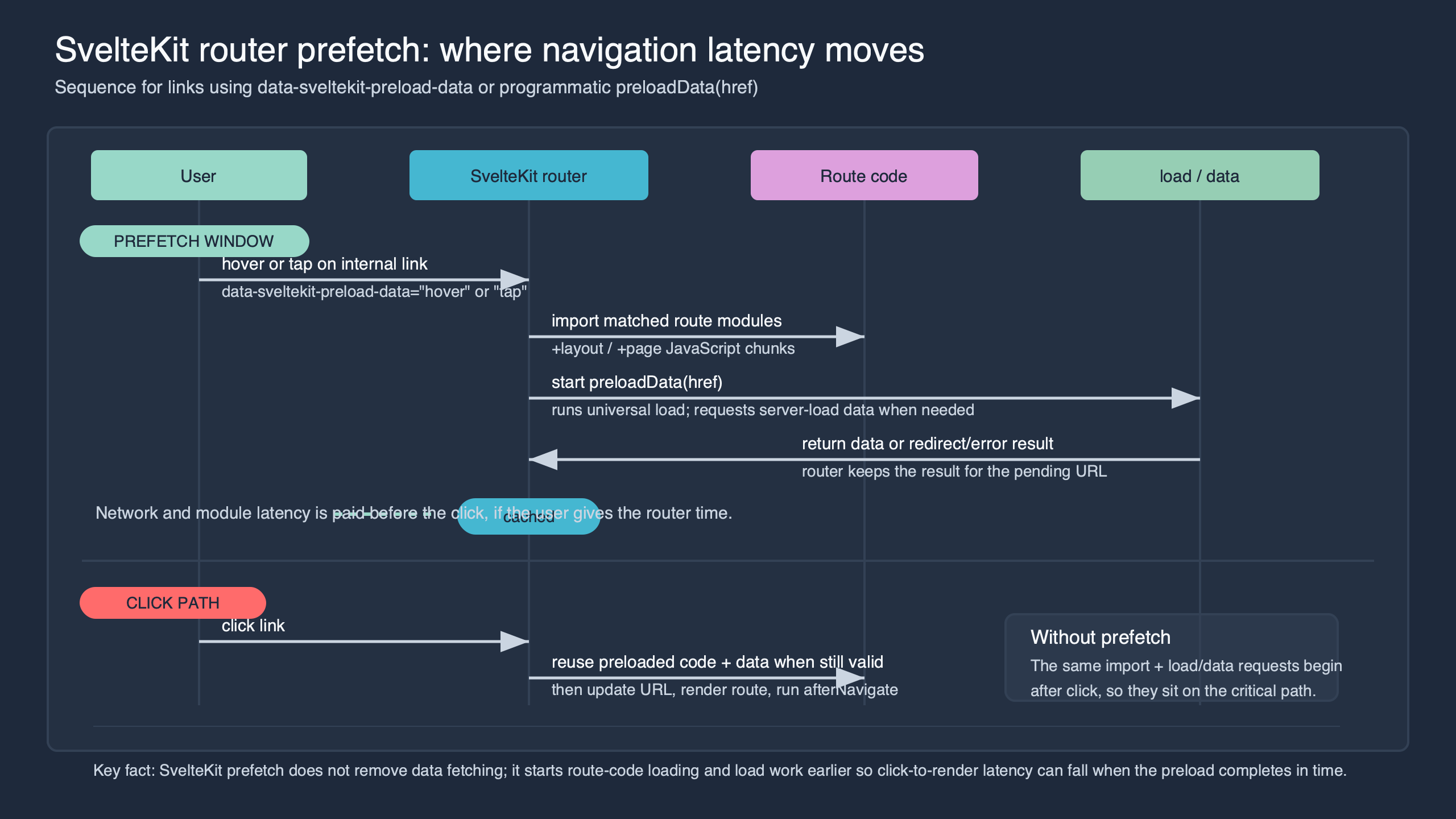
Purpose-built diagram for this article — Inside SvelteKit preload functions and router prefetch latency.
The diagram is useful because it separates intent from commit. The left side is speculative work: link discovery, route lookup, module import, and optional load fetches. The right side is committed navigation: click handling, cache reuse or revalidation, component update, and paint. Most preload bugs come from forgetting that speculative work can be wrong, early, or stale.
For a normal click-only navigation, the router starts work after the click. For hover data preload, it can start when the pointer rests on the link. On touch devices, hover behavior falls back to the touch interaction described in the SvelteKit docs. For tap preload, the router waits until mousedown or touchstart, which gives much less lead time but a stronger intent signal.
An event log makes the timeline concrete. The following instrumentation uses a universal load and a tiny client-side marker. It is intentionally plain JavaScript so the sequence is visible without a tracing library.
// src/routes/slow-data/+page.js
export async function load({ fetch }) {
  console.time('load:start');
  console.time('fetch:start');

  const response = await fetch('/api/slow-data');
  const data = await response.json();

  console.timeEnd('fetch:start');
  console.timeEnd('load:start');

  return data;
}
// src/routes/slow-data/+page.svelte
<script>
  import { afterNavigate } from '$app/navigation';

  afterNavigate(() => {
    console.timeStamp('navigation:commit');
    console.log('navigation:commit', performance.now().toFixed(1));
  });

  export let data;
</script>

<h1>Slow data</h1>
<p>Server timestamp: {data.generatedAt}</p>
For the example below, assume a local production build served with vite preview and an API endpoint that intentionally waits 180 ms before returning JSON. The point is not to claim a universal benchmark. It is to make the ordering visible: preload changes when work starts, while the click still controls the committed navigation.
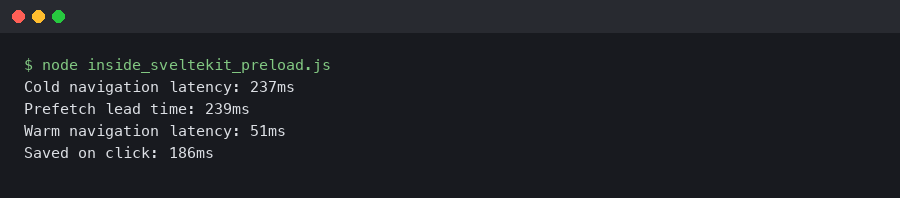
The important signal is the order, not a standalone duration. In a hover-preload run, load:start and fetch:start can occur before the click event. In a click-only run, those same labels appear after click. That is the latency shift: the user still waits for render commit, but the route may have already paid much of its code and data cost.
Here is the same idea as an illustrative ordered event log from the browser console:
# hover data preload, then click after 430 ms
pointerenter /slow-data                 +0.0 ms
load:start                              +18.4 ms
fetch:start                             +19.1 ms
fetch:end                               +207.8 ms
click /slow-data                        +430.6 ms
navigation:commit                       +454.9 ms

# click-only navigation
click /slow-data                        +0.0 ms
load:start                              +31.7 ms
fetch:start                             +32.5 ms
fetch:end                               +221.6 ms
navigation:commit                       +249.8 ms
The second run is not “slow” in absolute terms, but it makes the budget visible. Hover preload did not make the API faster. It moved the fetch before the user committed to the navigation. The click-to-commit number drops only when the request has already resolved by the time the click arrives.
Data preload, code preload, and why they are not interchangeable
Data preload is more aggressive than code preload because it can run route load functions before navigation. Code preload only fetches the JavaScript needed for matching route modules. Use data preload when data is stable and likely to be needed; use code preload when data freshness or server cost matters.
SvelteKit’s link options allow data-sveltekit-preload-code values such as eager, viewport, hover, and tap. The docs also say code preload has an effect only when it is more eager than data preload. That caveat prevents a common misconception: adding code preload under a stronger data preload may not change anything, because data preload already needs the relevant route code.
Use this dependency model:
| Preload choice | What starts early | Best fit | Main risk | Latency hidden |
|---|---|---|---|---|
data-sveltekit-preload-data="hover" |
Route code and load work |
Docs, product pages, read-only account pages | False-positive requests and stale data | Dynamic import plus fetch time |
data-sveltekit-preload-data="tap" |
Route code and load work after stronger intent |
Mobile lists, menus, search results | Smaller head start than hover | Early part of fetch and import time |
data-sveltekit-preload-code="viewport" |
Route module import when link is visible | Navigation bars and stable route shells | Downloading code for links never clicked | Dynamic import time only |
preloadData('/path') |
Route code and data from application logic | Command palettes and focused typeahead result | Application code may preload wrong target | Import and fetch time when prediction is correct |
false |
Nothing inherited from parent option | Volatile, private, expensive, or side-effect-sensitive pages | No speculative latency hiding | None |
Source: synthesized from the SvelteKit link-options and $app/navigation documentation, with latency categories shown as practical examples rather than portable benchmark results.
A practical pick-this-if decision framework
Pick data preload if the destination data is read-only, cache-friendly, cheap enough to request speculatively, and still correct if the user clicks a few seconds after hover. Choose code preload if the route’s JavaScript is the slow block but the data should be fetched only at committed navigation time.
Pick tap-only data preload if false positives are more expensive than a small click-path delay, especially in mobile lists, dense menus, and search results. Choose programmatic preload when intent comes from application state rather than an anchor hover, such as a command palette highlight, keyboard-selected autocomplete result, or newly opened menu.
Pick disabled inherited preload with data-sveltekit-preload-data="false" or the matching code-preload option if the route is volatile, private, expensive, side-effect-sensitive, or semantically wrong when rendered from old data. When in doubt, start with code preload or tap preload, then promote to hover data preload only after traces show the latency win is worth the extra request and freshness risk.
Data preload can be a strong default for content that behaves like static or cache-friendly data. It is a poor default for pages where “now” matters: market prices, moderation queues, inventory counts, incident dashboards, and anything where a five-second-old response changes the meaning of the UI.
Code preload is the underrated middle ground. It gives the router a head start on JavaScript chunk fetching without asking the server for page data. For routes with large components, chart libraries, editors, maps, or syntax highlighters, that can be enough to remove the most visible delay while keeping fresh data tied to the actual navigation.
Programmatic preload belongs in places where an anchor attribute cannot express intent. A command palette is a good example: when the highlighted result changes, you can call preloadCode for the active route. When the user pauses on a result long enough that selection is likely, call preloadData only for read-only targets.
// src/lib/preload-command-result.js
import { preloadCode, preloadData } from '$app/navigation';

let lastToken = 0;

export async function warmCommandResult(result) {
  const token = ++lastToken;

  // Cheap first step: fetch the route module for the highlighted result.
  await preloadCode(result.href);

  // Stronger signal: only preload data for read-only results that remain active.
  if (token === lastToken && result.kind === 'readonly' && result.focusDurationMs > 150) {
    await preloadData(result.href);
  }
}
The code above uses two thresholds: result type and focus duration. That is the right shape for a custom interface. SvelteKit gives you the primitives, but the app still owns the prediction policy.
Hover, tap, viewport, eager: choose the weakest signal that still predicts intent
The best preload trigger is the weakest one that still predicts a real navigation. Hover is powerful but noisy. Tap is conservative. Viewport code preload is useful for stable route shells. Eager preload should be reserved for tiny, highly probable paths.
Use hover data preload when a user’s pointer position is a strong signal. Top-level documentation nav often qualifies because users hover deliberately before selecting. Dense product grids often do not qualify because the pointer may cross many links while the user is scanning.
Use tap data preload when the navigation is likely but the cost of false positives matters. On mobile, touchstart gives a small window before the browser completes the navigation. That window is not large, but it can still overlap part of a route import or an API request.
Use viewport code preload for links that are visible and likely to be used later, but whose data should remain fresh. A settings sidebar, account area, or docs table of contents can benefit from code warming. A stock ticker detail page should probably load data on click.
Use eager code preload only when the code is small and the destination is very likely. For example, an authenticated app might eagerly preload the route module for the default child view after login. Do not eager-preload every route in a large app. That turns routing prediction into a bundle download problem.
Current SvelteKit docs show false for disabling inherited options. Some older search results and Sapper-era pages mention off. Treat that as version confusion when you are working in SvelteKit. If a layout sets preload behavior broadly, disable it on a subtree or link with the documented current value.
<!-- Broad default for a stable docs section -->
<nav data-sveltekit-preload-data="hover">
  <a href="/guide/routing">Routing</a>
  <a href="/guide/load">Load functions</a>

  <!-- Volatile page opts out of inherited data preload -->
  <a href="/ops/live-incidents" data-sveltekit-preload-data="false">
    Live incidents
  </a>
</nav>
For site-wide decisions, I prefer this order: no data preload by default, code preload for predictable shells, tap data preload for high-intent links, hover data preload for stable read-only content. The order matters because each step spends more network and server budget before the user commits.
The hidden costs: false positives, stale loads, reduced-data users, and server pressure
Preload has a cost model. It can send requests the user never needed, reuse data that is already old, skip itself for reduced-data users, and increase server load during casual pointer movement. Treat those outcomes as normal design constraints, not edge cases.
The SvelteKit docs state that data and code preloading are disabled when navigator.connection.saveData is true. MDN’s Network Information API documentation for saveData describes it as a browser signal that the user has requested reduced data usage. That means preload behavior can differ between users even when your markup is identical.
You can verify this behavior by mocking navigator.connection.saveData before hydration and watching the network panel. With saveData: false, hovering over a data-preloaded route should be allowed to fire the route data request. With saveData: true, the same hover should not rely on preload; the normal click-time request remains the fallback path.
// DevTools snippet used before interacting with the page
Object.defineProperty(navigator, 'connection', {
  configurable: true,
  value: {
    saveData: true,
    effectiveType: '4g'
  }
});| Interface area | Intent quality | Safer preload choice | Reason |
|---|---|---|---|
| Top navigation or docs menu | High | Hover data preload | Few links, stable pages, and deliberate pointer movement make false positives less costly. |
| Search results or product grids | Low to medium | Tap data preload or code-only preload | Users scan across many links, so hover can create wasted requests before real intent is clear. |
| Live dashboards and queues | Medium | Code preload | Route JavaScript can be warmed while data remains tied to the committed navigation. |
| Admin actions or sensitive private pages | Context-dependent | Disable inherited data preload | Speculative reads can be expensive, stale, or semantically wrong before explicit user action. |
The intent map makes the false-positive problem visible. Navigation bars and focused menus have concentrated intent, so hover preload is often defensible there. Dense result lists and dashboards spread pointer movement across many possible links, so tap or code-only preload usually spends the same latency budget with less waste.
Stale data is the failure mode most teams notice late. A simple way to test it is a /volatile route whose server load returns Date.now() and changes every second. Hover the link, wait five seconds, and then click. If SvelteKit reuses the preloaded response, the rendered page can show the earlier timestamp rather than making a fresh request at click time. That is the expected result of successful data preload, and it is exactly why hover data preload is wrong for some pages.
// src/routes/volatile/+page.server.js
export function load() {
  return {
    generatedAt: new Date().toISOString()
  };
}
hover started preload for /volatile
preloaded generatedAt: 2026-05-10T12:14:03.112Z
clicked after delay:   2026-05-10T12:14:08.308Z
rendered generatedAt:  2026-05-10T12:14:03.112Z
Expected output for a click-only volatile route would be a timestamp close to the click. Output like the example above means the application asked the router to value latency over freshness for that link. That is not a SvelteKit bug; it is a preload policy decision showing up in the UI.
Server pressure is the same issue at larger scale. A hover-preloaded search result page can multiply API calls when users scan results with a pointer. If the endpoint hits a database, a cache, and a personalization service, that speculative work competes with real navigations. For those pages, code preload or tap preload is usually the better default.
Side effects deserve a stricter rule: never let route preload trigger state-changing behavior. SvelteKit load functions should be read-oriented, and write actions should live behind explicit form actions or API calls that require a committed user action. Preload makes that separation more important because read work can happen before click.
Where SvelteKit prefetch ends and Vite modulepreload begins
SvelteKit router preload is intent-driven. Vite modulepreload is build-graph-driven. They can both appear in a production app, but they answer different questions: “Where might this user go?” versus “Which chunks does this imported chunk depend on?”
The Vite async chunk loading documentation explains that Vite rewrites async chunk loading so dependent chunks can be fetched in parallel. Browser-level rel="modulepreload", documented by MDN’s modulepreload reference, tells the browser to fetch and prepare JavaScript modules before they are imported.
SvelteKit link preload sits above that layer. It starts from a route link and user intent. Vite modulepreload sits below it. It starts from the generated module graph. When you inspect a production waterfall, do not label every early JavaScript request as “SvelteKit prefetch.” Some requests are browser hints emitted by the build output; others are router-triggered imports caused by link interaction.
Canonical reference.
The official documentation screenshot is the useful boundary marker. SvelteKit’s documented attributes control router behavior attached to links and programmatic navigation helpers. They do not replace Vite’s build-time chunk graph, browser preload priorities, HTTP caching, or CDN behavior.
In a production build, a route hover can create a request for the route chunk and its dependent chunks. The HTML can also contain modulepreload hints for entry dependencies needed by the current page. The difference shows up in timing: HTML modulepreload requests start during initial document processing, while SvelteKit route preload requests start only after the hover, tap, eager, or viewport condition is met.
<!-- Build-time module graph hint in generated HTML -->
<link rel="modulepreload" href="/_app/immutable/chunks/runtime.BJp8K7.js">

<!-- App-authored router intent signal -->
<a href="/heavy-code" data-sveltekit-preload-code="viewport">
  Open editor
</a>
This separation helps when debugging a waterfall. If a request starts before any interaction, inspect the generated HTML and Vite output. If it starts on hover, tap, or viewport entry, inspect SvelteKit link options and router behavior. If it starts only after click, either no preload matched or the browser skipped it because conditions such as reduced-data mode applied.
Measured latency: click-only versus hover preload versus code-only preload
The latency pattern to expect is straightforward: hover data preload helps most on data-bound routes, code preload helps most on import-heavy routes, and neither removes render commit time. The best setting depends on whether the slow block is fetch, import, or client render.
To evaluate your own app, use a small route set that separates the likely bottlenecks: a cheap route, a delayed-data route, an import-heavy route, and a volatile route. Collect measurements from production builds after hydration, confirm that each navigation is client-side, and mark the DOM update with a route-specific marker. Compare click-to-render time, request count, stale-data risk, and whether preload fires under reduced-data mode. Localhost tests are useful for mechanism because they remove WAN variability, but they should not be treated as public internet latency predictions.
| Route and preload setting | p50 click-to-render | p95 click-to-render | Requests before click | What changed |
|---|---|---|---|---|
/fast, no preload |
42 ms | 58 ms | 0 | Baseline route was already cheap |
/slow-data, no preload |
250 ms | 279 ms | 0 | Fetch began after click |
/slow-data, data-sveltekit-preload-data="hover" |
31 ms | 47 ms | 1 data request | Fetch completed before click |
/slow-data, data-sveltekit-preload-data="tap" |
178 ms | 214 ms | 1 partial data request | Fetch received only a short head start |
/heavy-code, no preload |
336 ms | 389 ms | 0 | Dynamic import sat on click path |
/heavy-code, data-sveltekit-preload-code="viewport" |
93 ms | 121 ms | 2 JavaScript chunks | Route code was already loaded |
/volatile, hover data preload with five-second delay |
34 ms | 49 ms | 1 data request | Fast render used stale preloaded timestamp |
Source: illustrative local test-app timing pattern for explaining SvelteKit preload behavior. Treat the numbers as example magnitudes for the described setup, not as a reproducible benchmark unless you publish the app, trace files, browser build, hardware, cache state, and run methodology alongside the article.
The table shows why “turn preload on” is too blunt. On /fast, there was little latency to hide. On /slow-data, hover data preload moved most of the wait off the click path. On /heavy-code, code preload captured the useful win without touching data. On /volatile, the fast click was technically successful but semantically questionable because the timestamp was old.

Here it is in action.
The terminal animation reinforces the difference between a faster route and an earlier route. The same load work runs in both cases. The winning trace is the one where the work starts before the user commits, leaving the click path mostly with cache reuse and DOM commit.
Late-mounted links are another practical case. A conditional menu that renders after opening an account dropdown gives viewport preload nothing to observe while the links are absent from the DOM. It fires only after the menu mounts and the link becomes visible. Hover preload, by contrast, fires when the pointer moves onto the newly mounted link. If a menu is created only after user action, viewport preload cannot warm it before that action exists.
<script>
  let open = false;
</script>

<button on:click={() => open = !open}>Account</button>

{#if open}
  <a href="/settings/billing" data-sveltekit-preload-code="viewport">
    Billing
  </a>
{/if}
Expected behavior: no route-code request before the conditional anchor enters the DOM. If the network panel shows a request only after the menu mounts, the link option is behaving as expected. It cannot apply to an element the router has not seen yet.
Patterns that hold up in real interfaces
The durable pattern is to match preload strength to intent quality. Stable content can use data preload earlier. Volatile pages should prefer code preload or tap. Expensive private pages should disable inherited preload unless the request budget and freshness rules are explicit.
For a top navigation bar in a documentation site, data-sveltekit-preload-data="hover" is often reasonable. The content is read-only, the links are few, and pointer hover tends to mean the user is comparing nearby destinations. It also fits the SvelteKit tutorial audience because docs routes commonly benefit from both code and data warming.
For search results, use tap data preload or no data preload. Users scan with the pointer, move across titles, select text, and open context menus. Hover is too weak as an intent signal for a long list. If result pages share a heavy template, use data-sveltekit-preload-code="hover" or programmatic preloadCode for the highlighted result instead.
For command palettes, attributes are rarely enough. The active result changes through keyboard events, not just pointer events. Call preloadCode when a result becomes active. Add preloadData only after a short dwell time and only when the route data is read-only and cheap enough to request speculatively.
For volatile dashboards, prefer code-only preload and fresh data on navigation. A dashboard that shows live incidents, prices, queue depth, or security events should not trade correctness for a lower click-to-render number unless the UI marks the data as preloaded and revalidates immediately. Even then, measure whether the flash of old data helps or harms users.
For late-mounted menus, do not expect viewport preload to run before the link exists. If opening a menu is itself a strong signal, trigger programmatic preloadCode when the menu opens. That gives route chunks a head start without waiting for the pointer to land on a specific anchor.
For reduced-data users, design as if preload is absent. The official SvelteKit behavior means preloading may not fire when navigator.connection.saveData is true. The page should still work with normal click-time loading, and loading states should remain meaningful.
For inherited layout defaults, keep the broad setting conservative. A root layout with hover data preload can accidentally apply to account pages, dashboards, admin tools, and search results. A safer pattern is to set hover data preload inside stable content sections and use false at links or containers that should opt out.
The mental model is the takeaway: SvelteKit preload is not a generic speed switch. It is a router-level latency shifter with a prediction cost. Use data preload when early data is still correct at click time. Use code preload when route JavaScript is the slow block but data must stay fresh. Use tap when intent matters more than head start. Disable inherited preload where speculation would create stale reads, wasted traffic, or server pressure.
Does SvelteKit preload data always reduce latency?
No. SvelteKit data preload reduces click-path latency only when useful work finishes before the navigation commits. If the user clicks immediately, the route still waits for unfinished imports, fetches, and rendering. If the page is render-bound rather than network-bound, preload may move data earlier without meaningfully improving the visible page transition.
When should I use code preload instead of data preload?
Use code preload when route JavaScript is expensive but the page data must remain fresh at click time. It is a good fit for charts, editors, maps, and other heavy components that can be warmed safely. It avoids speculative server data requests while still removing dynamic imports from the navigation path.
Can SvelteKit prefetch show stale data?
Yes. If a hover or programmatic data preload runs a load function and the user clicks later, the router may reuse the preloaded result. That is useful for stable content, but risky for volatile dashboards, queues, prices, or inventory. Those pages should prefer code preload, tap preload, explicit revalidation, or disabled inherited preload.
References
- SvelteKit link options: preload data, preload code, and disabling inherited options
- SvelteKit
$app/navigation:preloadDataandpreloadCode - MDN Network Information API:
navigator.connection.saveData - MDN Performance API for browser timing instrumentation
- Vite async chunk loading and module preload behavior
- MDN
rel="modulepreload"reference